

Live SAP equipment hierarchies and component replacements, right in Salesforce Field Service
Getting a clear SAP asset hierarchy in Salesforce Field Service shouldn’t require a manual reconciliation project. But industrial equipment is almost always a stack of parts rather than a single machine. A technician sent to service an industrial air conditioning unit is really working on a cooling assembly that holds a compressor module, and inside that module sit the sensors and filters, each with its own serial number, installation date, and service history.
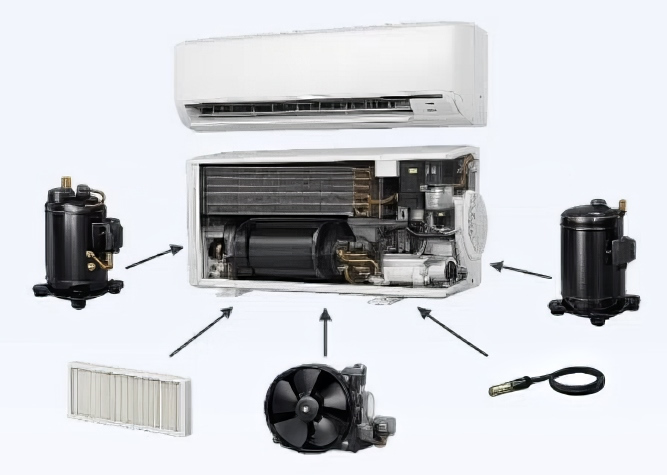
Example Equipment Hierarchy – Smart AC Unit. Installed equipment composed of multiple trackable sub-equipment
Most enterprises synchronize basic Installed Asset location and hierarchies between Salesforce and SAP. However, oftentimes, the full and updated hierarchy details of the installed and maintained asset lives only in SAP, while the technicians do their work in Salesforce Field Service. Reconciling those two systems is where things get difficult.
The standard Salesforce product consumption data fails to accurately reflect real-world equipment structures. As a result, equipment updates often rely on manual processes that are time consuming and prone to inconsistencies. Compounding the issue, organizations frequently struggle with limited traceability when components are installed, replaced, or modified, making it difficult to maintain a reliable history of equipment changes.
We recently worked with a high-tech manufacturer that wanted to solve this challenge and we co-developed a new Vigience Overcast feature for our SAP-integrated Field Service module.
Teams can now visualize the live SAP equipment hierarchy directly within Salesforce, giving them a clear and accurate view of installed assets. Field technicians can install, replace, or dismantle equipment with far greater ease, thanks to streamlined workflows that mirror real-world service processes. Once changes are validated, all updates are synchronized back to SAP, ensuring data consistency across both systems.
New Vigience Overcast Component: SAP Equipment Maintenance
A Lightning Web Component powered by Overcast displays the full SAP equipment hierarchy for each Asset managed in Salesforce. When a technician opens a Work Order for that unit, the component calls SAP live and renders the full sub-component hierarchy on screen, so what the technician sees is the current state in SAP. The sub-components and their service history stay in SAP, where they already live, and Salesforce reads them on demand.

The component supports four actions on any node in the tree:
- Install: add a new sub-equipment onto an existing node without removing anything else.
- Replace: swap a faulty asset for a new one, unlinking the old and linking in the new in a single step.
- Dismantle: remove an asset from the hierarchy.
- Edit: change asset data in SAP, such as the name or attributes of an existing asset, while leaving the hierarchy structure untouched.

A typical replacement runs in three steps. First, the technician opens the Work Order and drills into the live SAP equipment hierarchy to find the faulty part, say a Generation 3 compressor module. Next, they select that compressor, choose Replace, and enter the details of the new part, including the material number for the Generation 6 compressor, the installation date, and the new serial number; any other adds, changes, or removes for the visit go into the same queue. Finally, once the physical work is done, they post the intervention, and every queued change goes to SAP in a single orchestration. For the compressor swap, SAP creates a new equipment record for the Generation 6, assigns it an SAP equipment number, unlinks the old Generation 3 from the hierarchy, and links the new one into the parent AC unit at the correct node.
In Salesforce, the on-screen hierarchy refreshes with the new SAP equipment number already in place.
What the manufacturer got out of it
Field Service Technicians now view, update and manage SAP equipment hierarchies and component replacements directly in the field from their Salesforce Field Service application. The full equipment structure is represented in Salesforce, updates are automated and installed component changes are traced.
Want to see it in action?
This is one of several ways Overcast is closing the gap between what SAP knows and what your Salesforce Field Service teams can act on. If your technicians are still working from stale or partial equipment data, it’s worth a closer look.



Direct Contact
+1 (415) 226-9867
Vigience, Inc.
WATCH THE OVERCAST TEASER VIDEO
Social Media Channels


Compliance Certifications

Vigience Overcast is SAP certified


