Build-your-own Components for SAP and non-SAP systems

Overcast
Component Builder

  • Customize the Overcast Components without writing code
  • Build-your-own Components for SAP and non-SAP systems
  • Based on Salesforce Lightning Component Framework
  • Reduces Lightning UI development time from weeks to hours
  • Fully extensible with Apex and custom-built UI components
  • Future-proof: fully tested against every Salesforce upgrade

POINT-AND-CLICK LIGHTNING COMPONENTS

The Component Builder allows you to build and customize Overcast Components using the Overcast Component Framework – a meta-data driven approach to building Salesforce Lightning Components for real-time connected systems.

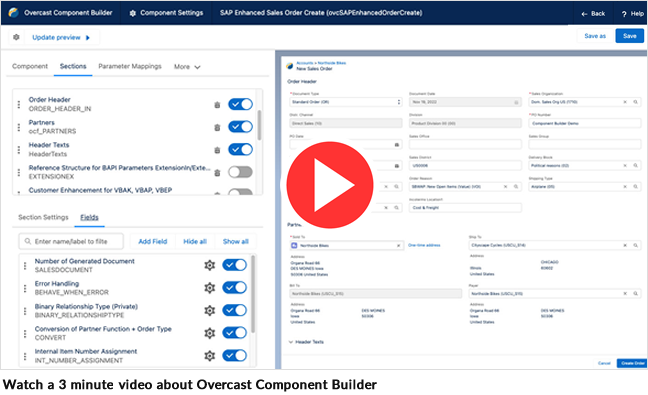
Overcast Component Builder is a point-and-click tool

The Component Builder

The Overcast Component Builder is a point-and-click tool that makes it easy to build Overcast Components, i.e. Salesforce Lightning Components that read or write data for any backend system, giving your users access to all the company’s data and information they need all in one place – regardless in which system it resides in.

Besides the ability to build-your-own, when you edit a prebuilt Overcast Component from the Component Library, you’re brought into the Overcast Component Builder to manage the component’s settings. You can update the component’s inputs, filter values, fields, labels, navigation, and field behaviors.

Overcast Components

Overcast Components are meta-data driven Lightning Components for the Salesforce mobile app and Salesforce Lightning Experience that are connected via an Overcast real-time Integration Scenario  to a backend data source. Overcast Components are a non-coding approach to displaying and editing a third system’s data  without having to copy the data to the Salesforce objects. In effect, it allows you to visualize any data in Salesforce while leaving the business logic and datastore in the connected system.

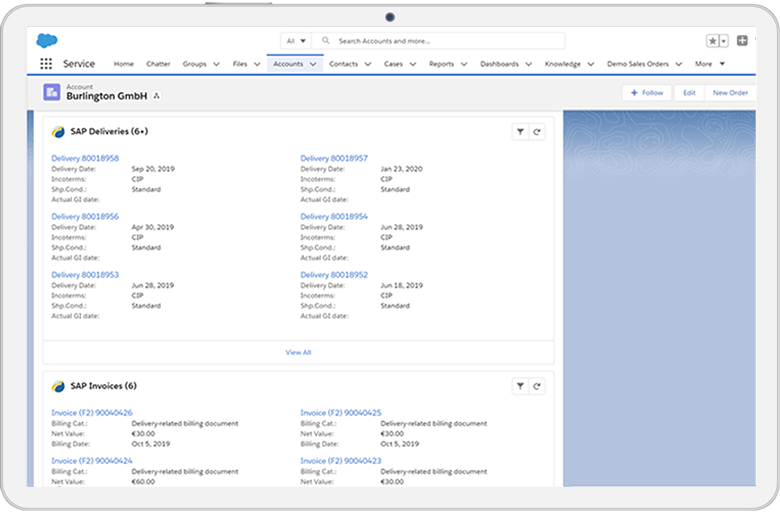
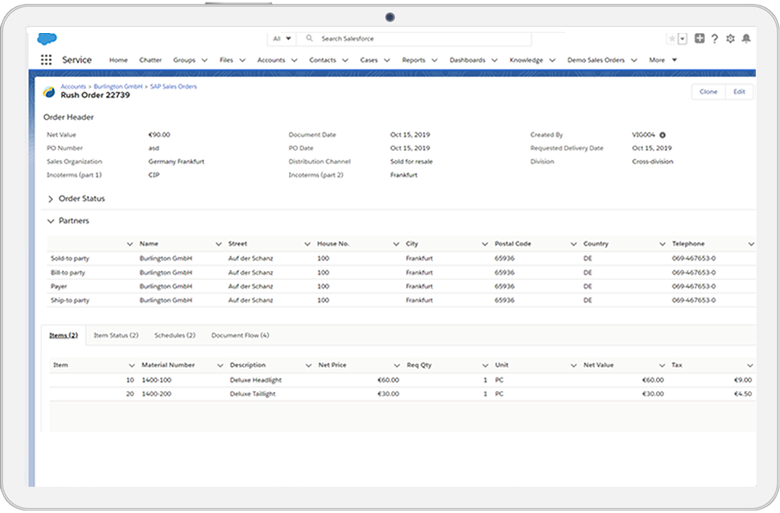
Overcast Components follow the Salesforce Lightning Design System but are optimized for complex business objects with complex header and item relationships. Here is a preview of Overcast Components built using the Overcast Component Builder:

Related SAP Deliveries & Invoices
SAP sales order display

Enhancement Concept and Business Logic

Overcast Components are one way to connect external systems. They come with an enhancement concept that allows for business logic to be added in the form of Apex code and even allows you to replace parts of the UI with a custom-built Salesforce lightning component. They support complex business objects with headers and items that need to be processed in one go. Overcast Components can be used side-by-side with the traditional Salesforce UI technology.

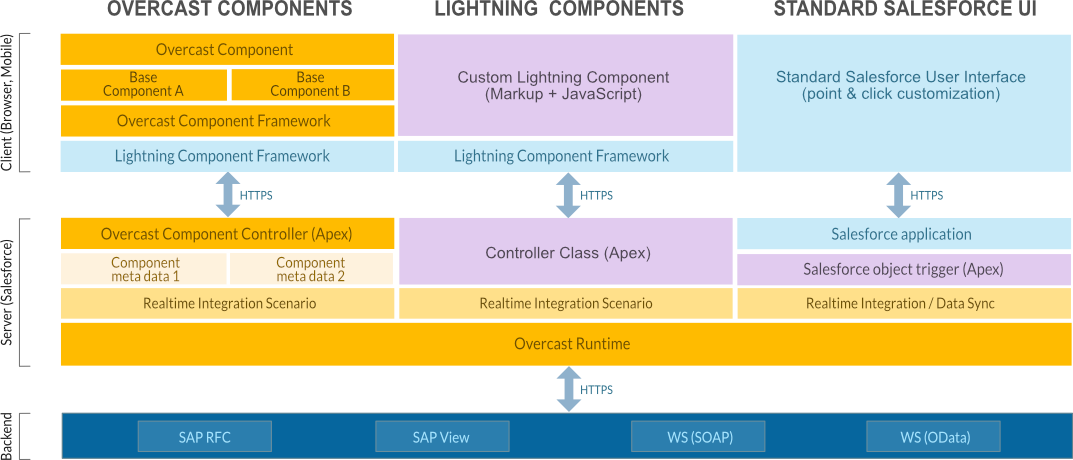
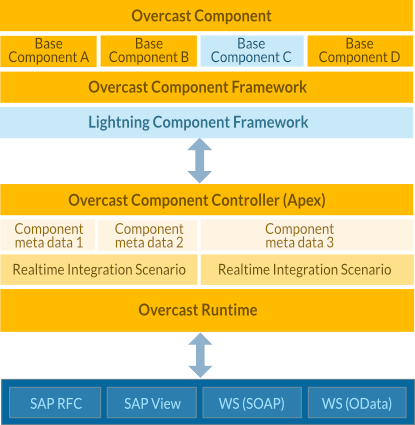
Frontend Architecture

Mix & match different frontend technologies for the optimal mix between user experience, development speed and solution maintainability! In a few simple steps, Overcast real-time integrations can be leveraged directly inside any existing standard Salesforce UI or within custom Salesforce Lightning Components. The Overcast Components provide a third option: extend the pre-built, standard Overcast Components or point & click build your own on the fly without writing code. The Overcast Component framework is metadata-driven and built on top of Salesforce Lightning.
Frontend Architecture

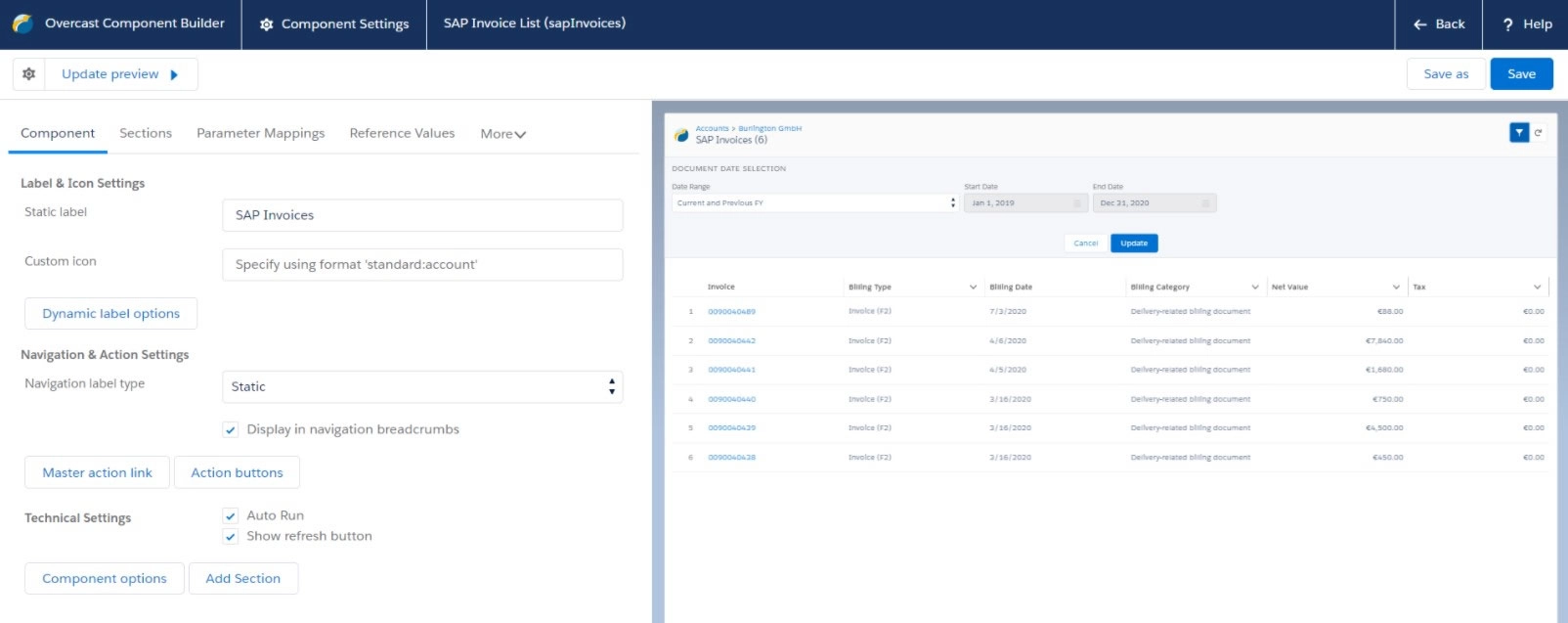
Tour the Overcast Component Builder

The Overcast Component Builder is the visual development tool to build and configure Overcast Components against any backend system or against any API from middlewares such as Mulesoft. Building re-usable UI components for Salesforce has never been easier or faster.

1
2
3
4
5
6
7
visual development tool
1

Point & click configure Overcast Components while seeing a live preview of the SAP connected Lightning Component

2

Change icons and labels on the fly. Work with Salesforce custom labels to create fully translatable lightning components.

3

Connect multiple Overcast Component definitions into little mini-apps, e.g. “Widget” links to “List” links to “Detail” links to “Edit” or “New” screen

4

Add not only sections (e.g. “Header”, “Partners” or “Items”) and fields coming from the backend API but also custom sections and fields.

5

Data shown is filtered through parameters mapped from the context (e.g. if the Component is on the “Account” page, only show me data for the Account I am looking at). Alternatively, select the fields that the end user can use to provide filter criteria to the backend API.

6

Select which fields to display in which UI layout. Supported layouts are Salesforce Lightning Design System components such as Tile, List, Accordion, Toast, etc.

7

Dynamically pass Salesforce object or related object fields or other reference values to the Component

Change labels, select which fields to show where on the UI, decide if you want to show data as tiles or tables or add custom business logic in the form of Apex scripts within pre-determined Overcast Component Framework “extension points”.

While the visual UI development approach ensures fantastic development speed and ease-of-maintenance, the ability to seamlessly extend the metadata-driven Overcast Components with custom Lightning Components ensures you don’t ever have to make sacrifices in user experience.

related blog posts

Salesforce Customer 360 – worth nothing without SAP data

This blog will discuss why Salesforce Customer 360 can only live up to its full potential when integrated with SAP or other ERP systems.

The new Enhanced SAP Sales Order Management

One of the most in-demand features of Overcast is SAP Sales Order Management. In this post we discuss the features and the highlights of our new version.

The #1 Salesforce-Native Integration App

  •  Overcast is a Salesforce-native cloud integration service that lets you quickly and easily  connect Salesforce to your SAP, Oracle, Microsoft and other on-premise applications.
  •  No on-premise software or middleware installations.
  •  Thousands of SAP business objects can be integrated in a point-and-click fashion.