Product Updates, Technical Articles
Introducing the Overcast API Management
With our Summer 2022 release, we introduced the Overcast API Management, an easy way to expose SAP BAPIs, tables and even non-SAP backends as web services. This allows organizations that use Overcast not only to integrate any backend into Salesforce, but also into other platforms. Typical use cases are the integration with web apps like shops or portals, mobile applications or other on premise systems. The Overcast API Management also allows you to give access to the API to partners and 3rd parties in a secure way. This blog shows how the API Management works and how easy it is to set it up.
Overcast Integration Scenarios and Components
Overcast has the concept of Integration Scenarios and Components. Both are important when it comes to the API Management:
Overcast Integration Scenario
The Integration Scenario describes which backend source you want to integrate. It has (1) a record type (Real-time or Data Synchronization), (2) a backend type (BAPI, SAP table, OData, SOAP, etc.) that is defined by the connection string and (3) a specific object or table. On top of that it describes (4) which fields of the object you want to integrate. An example for an Integration scenario can be seen in the following screenshot.
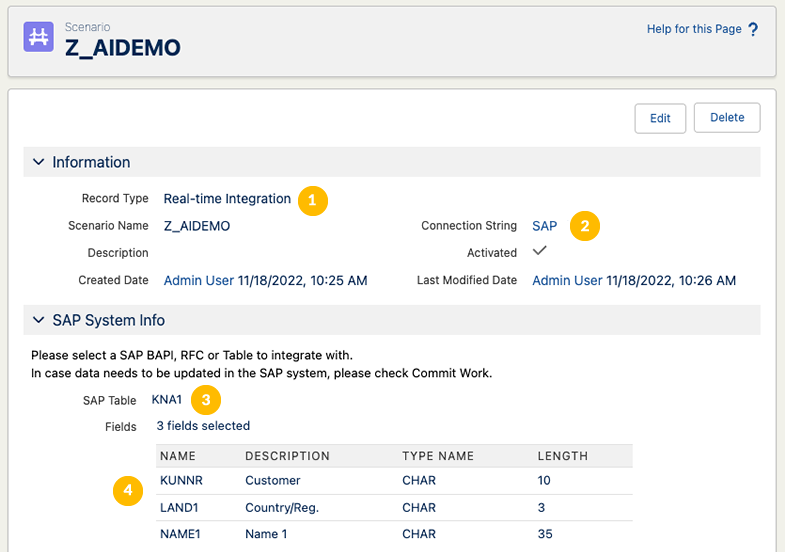
An integration scenario for reading the KNA1, the SAP table for business partner master data
Overcast Components
Overcast Components are a way to build integrations to external or backend systems for users in Salesforce using configuration rather than code. They require a real-time scenario as their basis and provide the user interface to display the corresponding data. Overcast Components can be built without coding by using the Overcast Component Builder.

Exposing an Integration Scenario as REST Web Service
In this example we want to expose the list of SAP Sales Orders as a REST web service by using BAPI_SALESORDER_GETLIST. We will use Postman https://www.postman.com to show how the API can be consumed.
Create the Integration Scenario
As a bases for our RESTful web service, we first need to create an integration scenario or use an existing one. As Overcast offers more than 150 predefined integrations for the most common use cases for SAP, Microsoft Business Central/Dynamics and Oracle NetSuite, there is already plenty to choose from. A step-by-step guide about how to create your own scenario can be found in the Overcast help.
Custom Permission for allowing API access
For obvious reasons, not every Overcast integration scenario is automatically exposed in the API Management. To allow this, a custom permission must be created. The permission must follow this naming convention:
Overcast_Rest_ < integration scenario name >
Therefore, in our example, the name must be Overcast_Rest_sapSalesOrderList. This permission must be added to any user, that wants to call the API.
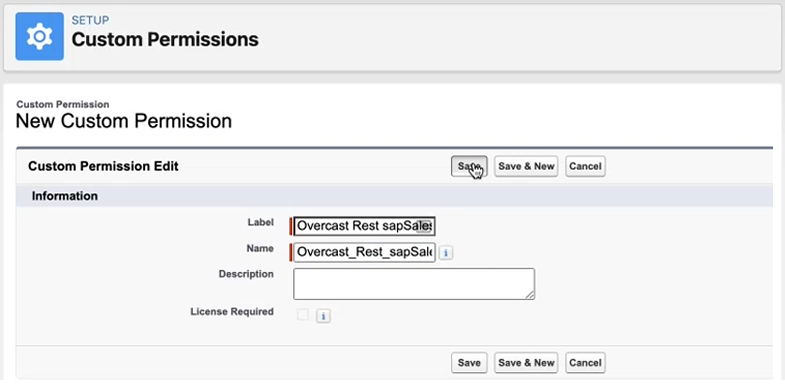
Custom permission for calling the sapSalesOrderList scenario
Authorization
For the authorization we are using the Salesforce OAuth 2.0 protocol. Details can be found here
Calling the service
URL: /services/apexrest/overcast/integration/v1/
Most scenarios require some type of input parameters. They can be passed to the API in multiple ways.
URL Query Parameters
Parameters are added to the URL as key/value pairs. If we want to filter the list of Sales Orders by business partner number, it will look like this:
/services/apexrest/overcast/integration/vi/sapSalesOrderList?CUSTOMER_NUMBER=0000001001
Parameters as part of the URL
You can also add the parameters to the URL, separated by a /. For this, use the parameters in the same order, as they are in the scenario.
/services/apexrest/overcast/integration/vi/sapSalesOrderList/0000001001
Request with body
The body of the request can be used to transfer more complex structures as input to the service. With one or multiple records or structures can be passed in as JSON. The following for example is the input for the BAPI to fetch the sales order details:
{
    "SALES_DOCUMENTS": [
        {
            "VBELN": "0000020874"
        }
    ],
    "I_BAPI_VIEW": {
        "INCOMP_LOG": "",
        "CREDCARD": "",
        "CONFIGURE": "",
        "BILLPLAN": "",
        "FLOW": "",
        "TEXT": "",
        "CONTRACT": "",
        "SDCOND_ADD": "",
        "SDCOND": "",
        "STATUS_I": "",
        "STATUS_H": "",
        "ADDRESS": "X",
        "PARTNER": "X",
        "BUSINESS": "",
        "SDSCHEDULE": "",
        "ITEM": "X",
        "HEADER": "X"
    }
}
Response from Overcast
The result is returned in JSON form and looks like this:
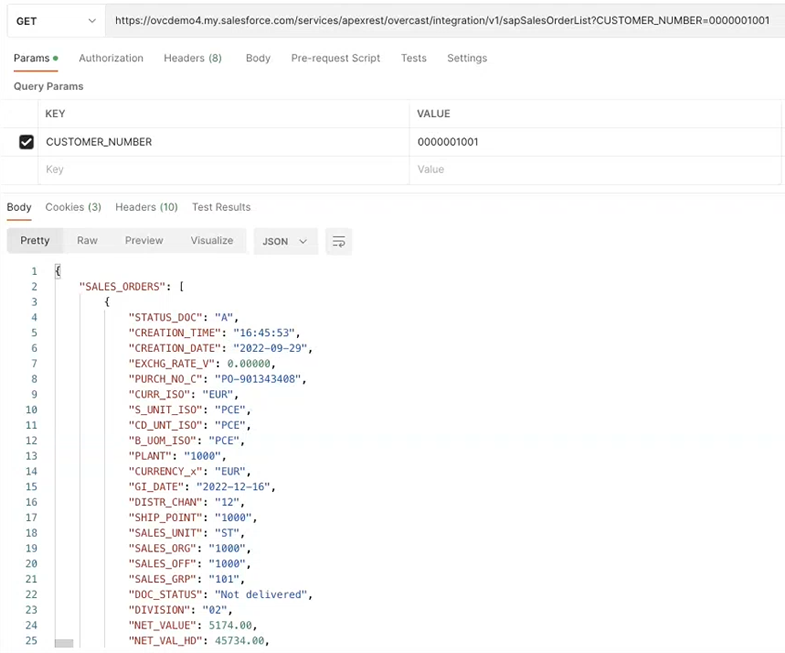
The result of an API call displayed in Postman
The JSON can be read and transformed by any modern platform like J2EE or .Net running on premise or in the cloud on for example Amazon AWS, Microsoft Azure, Google Cloud or your own service.
Conclusion
The Overcast API Management allows you to turn any SAP and none-SAP backend data source into a web service without the need to write any code. If you want to learn more about how Overcast and how our REST API can help your organization to expose SAP and none-SAP data, get in touch with us.
AUTHOR

Alexander Ilg


Direct Contact
+1 (415) 226-9867
Vigience, Inc.
WATCH THE OVERCAST TEASER VIDEO
Social Media Channels


Compliance Certifications

Vigience Overcast is SAP certified